You pay every month. The balance barely moves.

Payoff Planner shows the date you'll be debt-free, how much interest you'll save, and exactly what to pay each card or loan this month.

Get Payoff Planner — $17

One-time purchase. Phone, tablet or computer. Works offline. No bank login, no account, no subscription.

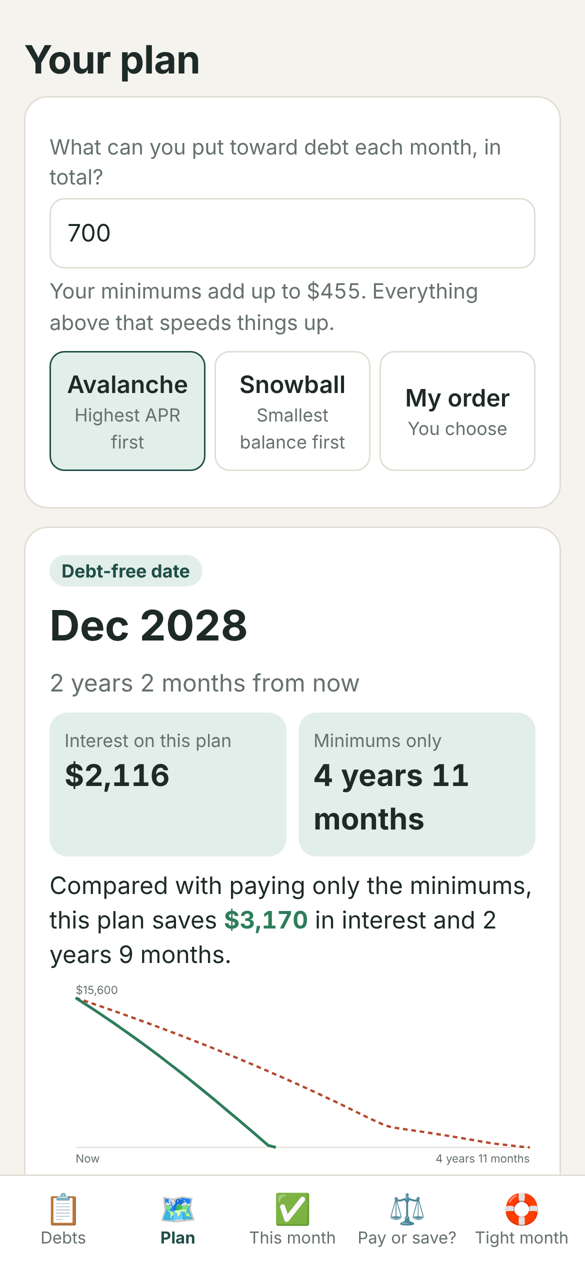
Payoff Planner shows a debt-free date and a chart comparing the plan with minimum payments

“I don't even know which card to pay first.”

On a card at 24.99% APR, a $3,200 balance adds about $67 of interest a month. If the minimum is $95, most of the payment goes to the bank and the balance drops by less than $30. Spreading a little extra across every card feels responsible, but it's the slowest way out.

What helps is one number and one rule: a fixed amount each month for all your debts, and every extra dollar pointed at one debt at a time. That's the method behind the avalanche and snowball plans. Payoff Planner does the math and turns it into a list you can follow.

Example: four debts, $15,600

Visa, 24.99%$3,200
Store card, 29.99%$850
Mastercard, 19.49%$2,150
Car loan, 7.9%$9,400
Minimums only ($455/month)4 yrs 11 mos
$700/month, avalanche2 yrs 2 mos
Interest saved$3,170

Calculated by the app with fixed APRs, fixed minimums and no new charges. Your numbers will differ.

How it works

1

Add your debts

Name, balance, APR and minimum, straight from your statements. Two minutes.

2

Pick a monthly amount

Choose avalanche, snowball or your own order. See your debt-free date and what each extra $25 changes.

3

Follow this month's list

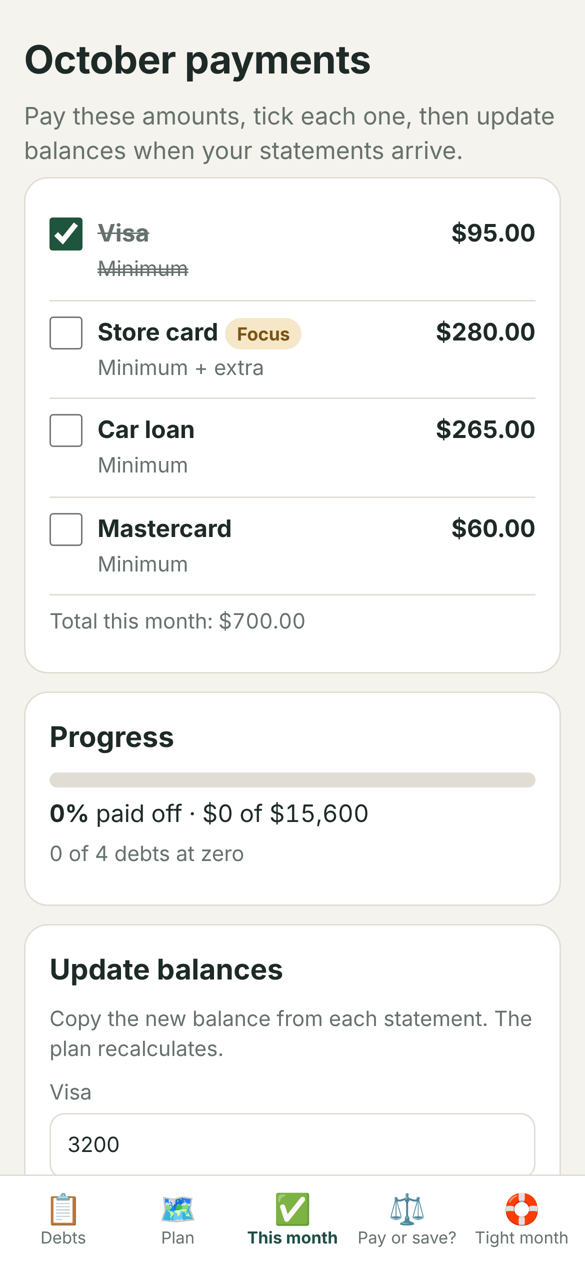
The app tells you what to pay each debt. Tick them off, enter new balances when statements arrive.

This month's payments, one amount per debt, with a focus debt

What's inside

  • Debt-free date and total interest, compared with paying minimums only
  • Avalanche (highest APR first), snowball (smallest balance first) or your own order, side by side
  • “What if I add $25, $50, $100?” table
  • This month's payment list, with the focus debt marked
  • Progress bar and payoff order, with dates
  • “Pay off debt or save?” helper: emergency cushion, employer match, high-rate debt
  • “Tight month” plan: what to pay first and what to say when you call your card company
  • Backup file to move to a new phone

Your numbers stay with you

No bank connection, no account, no password to create. Your debts are stored only on your device. Many budgeting apps charge every month; this one costs $17 once.

Choose your version

Payoff Planner

$17

The app. One-time, includes future updates.

Get the app
Most complete

App + Debt Free on Less workbook

$27

The app, plus the 20-page workbook: bare-bones budget, 30-day spending log, scripts to ask for a lower rate or a hardship plan.

Get both

After checkout you get a link and a license key by email. Open the link, paste the key once, then add it to your home screen.

Not ready? Start with the free hardship call script.

A 3-page printable: what to say when you call your card company about a lower rate or a payment plan. Free PDF, no email needed.

Download the free script

Questions

Is it an App Store app?

No. It's a web app: you open a link in your browser and add it to your home screen. It then opens like an app and works without internet.

Which devices?

iPhone, Android, iPad, Mac, Windows and Chromebook, with any recent browser.

Avalanche or snowball?

Avalanche (highest APR first) costs the least interest. Snowball (smallest balance first) clears a debt sooner, which keeps some people going. The app shows both with your numbers, so you can see the difference in dollars before you choose.

Does it connect to my bank?

No. You type in the balances from your statements. Nothing is sent to us or to anyone else.

Is this financial advice?

No. It's a calculator and organizer. It uses your numbers and common payoff methods; it doesn't know your taxes, loan terms or job situation.

Refunds?

If Payoff Planner doesn't work on your device, write to us within 14 days through Gumroad and we'll refund you.